How to Find Business Email Addresses: how to find business email addresses fast
January 3, 2026
Finding a business email address is part detective work, part science. You can do the manual legwork—running smart Google searches and digging through LinkedIn profiles—or you can lean on specialized email finder tools. Often, the best approach is a mix of both. The end goal is always the same: figure out a prospect's email pattern, like firstname.lastname@company.com, and then make sure it's valid before you hit send.
This isn't just about checking a box; it's about turning a cold outreach process into a reliable way to generate revenue.
Why Accurate Business Emails Are Your Sales Superpower
Let's be real—a bad email list is a huge time and resource sink for any sales team. When you're trying to cut through the noise in a packed B2B market, a verified list of contacts isn't a nice-to-have; it's a fundamental advantage. It’s what lets you book more meetings and close deals faster.
Inaccurate data isn’t just about a few bounced emails. The costs are real, and they can be surprisingly high.

The Hidden Costs of Bad Data
Every single email that bounces is a conversation that never happened. But the damage goes deeper than that. When you repeatedly send messages to invalid addresses, email providers like Google and Microsoft take notice. Your sender reputation takes a hit, and suddenly your domain gets flagged as spam.
This means that even your perfectly crafted emails to legitimate, valid prospects might start landing in the junk folder—or worse, not getting delivered at all.
Think about the sheer volume of emails flying around. By 2026, it's projected that businesses will send and receive a mind-boggling 392.5 billion emails every day worldwide. Standing out in that flood of information is tough enough without a high bounce rate working against you. You can dive deeper into these email trends and explore the full report for more context.
A clean email list is your first line of defense against being ignored. It ensures your carefully crafted messages actually have a chance to be seen by the right decision-makers, rather than getting lost in the digital noise or blocked by spam filters.
Turning Outreach into a Predictable Engine
The solution here isn't just about finding an email address. It’s about finding the right one and confirming it actually works. A validated contact list delivers a few key advantages that directly boost your bottom line:
- Increased Efficiency: Your sales reps stop wasting time on bounces and dead ends and spend more time actually talking to qualified leads.
- Higher Deliverability: Protecting your sender score means your messages consistently land where they belong: the primary inbox.
- Improved Conversion Rates: When you reach the right person with a relevant message, you drastically increase your odds of getting a response.
This guide is your roadmap to getting there. We'll walk through a blended approach that combines clever manual techniques with smart automation, helping you build a reliable system for generating revenue.
Uncovering Emails with Manual Search Tactics
Before you even think about paying for a fancy email-finding tool, it's crucial to get your hands dirty with some old-fashioned manual prospecting. Why? Because these free methods are shockingly effective. More importantly, they teach you how to think like a detective, a skill that will make you far more successful even when you eventually start using paid tools.
Master Advanced Search Operators
Your Google search bar is a prospecting powerhouse if you know the right commands. These are called search operators—special characters and instructions that let you filter out all the noise and get straight to the good stuff. It's the difference between a wild guess and a precision strike.
Instead of just typing "Jane Doe Acme Corp email," you can build a much smarter query.
For example, I use this kind of structure all the time:
("Jane Doe" OR "J. Doe") AND "Acme Corp" AND (email OR contact)
This one simple line tells Google to only show me pages that mention either "Jane Doe" or "J. Doe," and the company "Acme Corp," and the word "email" or "contact." It's a quick and powerful way to zero in on the right pages.
There are a bunch of these operators. Using quotation marks for exact phrases, the site: command to search just one website, and boolean logic like AND/OR can be combined to make your searches incredibly precise.
Strategic LinkedIn Sleuthing
LinkedIn is an absolute goldmine for anyone in B2B. But just sending a connection request and hoping for the best isn't a strategy. You need to put on your detective hat and analyze profiles and company pages to make an educated guess about their email.
Start on the company's main page. I often find that if I scroll through their employee list or posts, I can find the email addresses of a few junior-level employees. That's my key—it gives me the company's email pattern.
- Is their format firstname.lastname@company.com?
- Or do they prefer firstinitial.lastname@company.com?
- Maybe it’s as simple as firstname@company.com.
Once you've spotted the pattern, you can apply it to the person you're actually trying to reach. If you see a sales rep listed as j.smith@acmecorp.com, you can be pretty confident that the CEO, Jane Doe, is j.doe@acmecorp.com.
Pro Tip: This might sound obvious, but always click the "Contact Info" link on an individual's LinkedIn profile. So many people forget to do this! You'd be surprised how often prospects leave their email publicly visible, saving you all the guesswork.
Don't forget to check your mutual connections, either. If you have a trusted contact in common, a quick message asking for a warm introduction (or even the email address directly) can be the most effective route. This instantly turns a cold outreach into a warm one.
Mining the Company Website
It's amazing how often people overlook the most obvious place to find an email: the company's own website. It takes a little digging, but the emails you find here are almost always accurate and actively monitored.
You just have to know where to look.
Key Pages to Investigate:
- About Us / Our Team: This is your first stop. Many companies, especially smaller ones, proudly list their leadership team along with job titles. Sometimes, you'll find direct email addresses right there.
- Press Releases / Media Kit: This is a fantastic, under-the-radar source. Press releases are written for journalists and almost always include a dedicated media contact's name, title, and direct email address.
- Blog Posts: Check the author bio at the top or bottom of articles. Companies often encourage their experts to write, and they'll frequently include the author's contact info or social links in the byline.
By combining these manual techniques, you can build a powerful, no-cost system for finding just about anyone's business email. These are the foundational skills that separate the amateurs from the pros, giving you a deep understanding of the prospecting process that will pay off for years to come.
Picking the Right Email Finder Tool
Sooner or later, manual searching just won't cut it. When you've hit a wall or simply need to find contacts at scale, it’s time to call in the cavalry: specialized email finder tools.
These platforms are built to do the heavy lifting for you. They crawl the web, tap into massive contact databases, and surface the email addresses you need in a fraction of the time it would take to do it by hand. They turn a tedious research project into a streamlined part of your sales process, which is exactly what you need to build a predictable pipeline without burning out your team.
But not all tools are created equal. The right one for you really depends on your workflow, budget, and what you’re trying to accomplish.
H3: Browser Extensions for On-the-Fly Lookups
The most straightforward and often handiest option is a browser extension. These are lightweight little tools that live right in your browser, usually as an icon next to the address bar.
When you land on someone's LinkedIn profile or a company website, you just click the button. The extension gets to work, searching for that person's email in real-time. It’s perfect for those moments when you’ve found the perfect person to talk to and need their contact info right now.
Who they're for: Sales reps doing targeted, account-based prospecting who just need a few key contacts each day.
- The upside: Super simple to use, fits right into your existing workflow (especially on LinkedIn), and most have a decent free plan for low-volume searching.
- The downside: Not built for speed or scale. Trying to build a list of hundreds of contacts this way would be painfully slow.
H3: Bulk Finders for Serious List Building
If your goal is to build a big, targeted list from scratch, a bulk email finder is your best friend. These are web-based platforms where you can upload a CSV file with a list of names and company domains.
The tool then churns through your list in the background, hunting down and verifying the email for each person. This is the go-to method for gearing up for a big outreach campaign or just loading your CRM with a fresh batch of qualified leads. For a deeper dive into how these platforms work, a solid Wiza email finder tool review can show you what to expect from a top-tier provider.
H3: APIs for Custom Integrations
For the more technically inclined teams, an Email Finder API provides the ultimate power and flexibility. An API (Application Programming Interface) lets you plug the email-finding engine directly into your own software, like your CRM or any custom internal tools.
Imagine this: a new lead gets added to your CRM, and an API call is automatically triggered in the background. A moment later, their contact record is updated with a verified email address—no clicks, no manual work.
An API transforms email finding from an active task into a completely automated, invisible process. It’s the top choice for sales ops teams who want to build a truly customized and efficient prospecting machine.
This is the path you take when you're dealing with a high volume of leads and need total control over how and when your data gets enriched.
H3: Email Finder Tool Comparison
Choosing a tool can be tough, so here’s a quick breakdown to help you see how the different types stack up against each other.
| Tool Type | Best For | Cost Model | Key Features |
|---|---|---|---|
| Browser Extension | Quick, targeted lookups while browsing LinkedIn or company sites. | Freemium, with monthly subscriptions for more credits. | On-demand search, LinkedIn integration, simple UI. |
| Bulk Finder | Building large prospect lists for campaigns from a list of names. | Pay-per-email or bulk credit packages. | CSV upload/download, list verification, CRM sync. |
| API | Integrating email discovery directly into your own software or CRM. | Usage-based (per API call) with tiered monthly plans. | Real-time enrichment, developer-friendly, high scalability. |
Ultimately, the goal is to find a tool that slots neatly into your existing process and gives you reliable data.
H3: What to Look for in a Great Tool
As you start comparing options, you'll notice they all promise the world. To cut through the noise, focus on a few key features that really make a difference.
Here’s my checklist for what a solid email finder should offer:
- Verification & Confidence Scores: A good tool doesn't just hand you an email; it tells you how likely it is to be correct. Look for a confidence score (like 95% deliverable) or a clear status like "Verified" or "Risky." This saves you from a high bounce rate.
- Data Transparency: Ask where the data comes from. The best tools use a mix of methods—public data scraping, private data partnerships, and real-time verification checks—to get the most accurate results.
- CRM Integrations: Life is just easier when your tools talk to each other. A direct connection to your CRM (like Salesforce or HubSpot) lets you push new contacts and their data over with a single click.
- A Fair Credit System: Most tools run on credits, where one successful search costs one credit. Pay attention to the fine print. The best platforms only charge you for verified, high-confidence emails, not for guesses or invalid ones.
Picking the right tool is a small investment with a huge payoff. After all, email is still king in B2B. In some industries, it delivers a staggering 45:1 ROI. Compare that to social media, where only 16% of B2B buyers even prefer to be contacted. Those numbers make it crystal clear: a high-quality email list is one of the fastest routes to growing your revenue.
Why You Can't Afford to Skip Email Verification
Finding what looks like the right email address is just the starting point. The real work—and the part that separates a killer outreach campaign from a total flop—is making sure that email is actually valid.
Honestly, skipping verification is like building a house without checking the foundation first. It might look fine for a little while, but it's guaranteed to crumble. This isn't just about dodging a few bounce-back notifications; it's about protecting the single most important asset you have in email outreach: your sender reputation.
The Hidden Cost of a "Dirty" Email List
Every time you send a message to an invalid address, it bounces. A few stray bounces are normal, but when the numbers creep up, email providers like Google and Microsoft take notice. A high bounce rate is a massive red flag that screams "spammer."
Once your domain gets a bad reputation, your deliverability for all emails tanks. Suddenly, those perfectly crafted messages to your most promising leads are landing straight in the junk folder, never to be seen. You're not just failing to connect with the bad contacts; you're actively sabotaging your chances of reaching the good ones.
Think of your sender reputation as a credit score for your email domain. Every bounced email is like a missed payment. Too many, and your account gets frozen. Verification is the discipline that keeps your score high and your outreach effective.
Getting this right is more critical than ever. With a projected 4.73 billion people using email by 2026, the inbox is a battlefield. Your prospects are already wading through more than 100 emails a day, so your first impression has to count. A clean list ensures you don't waste that one shot on an address that doesn't even exist. There are some incredible email statistics that highlight just how crucial accuracy is for modern outreach.
So, How Does Email Verification Actually Work?
It’s not some dark art; it's a quick, logical process. Most modern verification tools run a series of checks in the background to figure out if an email is safe to send to.
Here’s a simplified look at what’s happening behind the scenes:
- Syntax Check: First, the basics. The tool scans the email to see if it follows the standard
name@domain.comformat. This catches simple typos and formatting mistakes right away. - Domain Check: Next, it looks at the domain itself (
@company.com). Is it a real website? Does it have mail servers set up to receive email? This weeds out addresses with fake or defunct company domains. - SMTP Ping: This is the clever part. The tool sends a tiny, invisible handshake request to the recipient's mail server. It essentially asks, "Hey, does this user exist?" without actually sending an email. The server's response confirms if the address is valid or not.
This whole sequence gives you a clear verdict on each email, which is exactly what you need to keep your prospecting list healthy and effective.
What to Do with the Verification Results
After a tool runs its checks, you’ll get a status for each email. Knowing how to interpret these results is the key to proper list hygiene.
- Valid / Deliverable: Green light. The server confirmed the address is real and ready to receive mail. These are the contacts you can confidently add to your campaigns.
- Risky / Accept-All: This is a tricky one. It means the company’s mail server is set up to "catch all" emails sent to that domain, so it won’t tell you if a specific inbox is real or not. Some of these might be valid, but the bounce risk is much higher. I'd recommend using these sparingly, maybe for lower-priority campaigns, or not at all if you want to be extra safe.
- Invalid / Undeliverable: Dead end. The server has flat-out confirmed this address doesn't exist. Delete these from your list immediately. Keeping them around is just asking for a damaged sender reputation.
By sorting your list based on these statuses, you move from a "spray and pray" mindset to a smart, data-backed strategy. It's the final quality check that ensures your deliverability stays high, your engagement rates improve, and you get a much better return on the time and effort you put into every single campaign.
Automating Your Prospecting to Scale Revenue
So far, we've walked through the hands-on tactics and standalone tools for digging up business emails. These methods absolutely work, but they have a ceiling. If you want to build a serious sales machine that scales, you need to connect the dots with end-to-end automation.
Modern sales automation platforms are built to run your entire prospecting workflow. They don't just find a single email; they manage the whole journey from discovering a great-fit lead to sending the final follow-up. The whole point is to get your sales reps out of the weeds of manual, repetitive work so they can focus on what they're paid to do: build relationships and close deals.
Building an End-to-End Sales Machine
Picture this: a system where you define your Ideal Customer Profile (ICP), and it automatically scours the web for decision-makers who match. Then, it finds and verifies their contact info and drops them into personalized outreach sequences. That’s the real power of automation.
This isn't just about moving faster. It's about creating a consistent, predictable stream of qualified leads flowing into your pipeline. When your team can trust that new, verified prospects are being added to their outreach lists every single day—without them lifting a finger—they can operate with way more focus and confidence.
This simple workflow is the engine of any great outbound strategy: find, verify, and reach out.
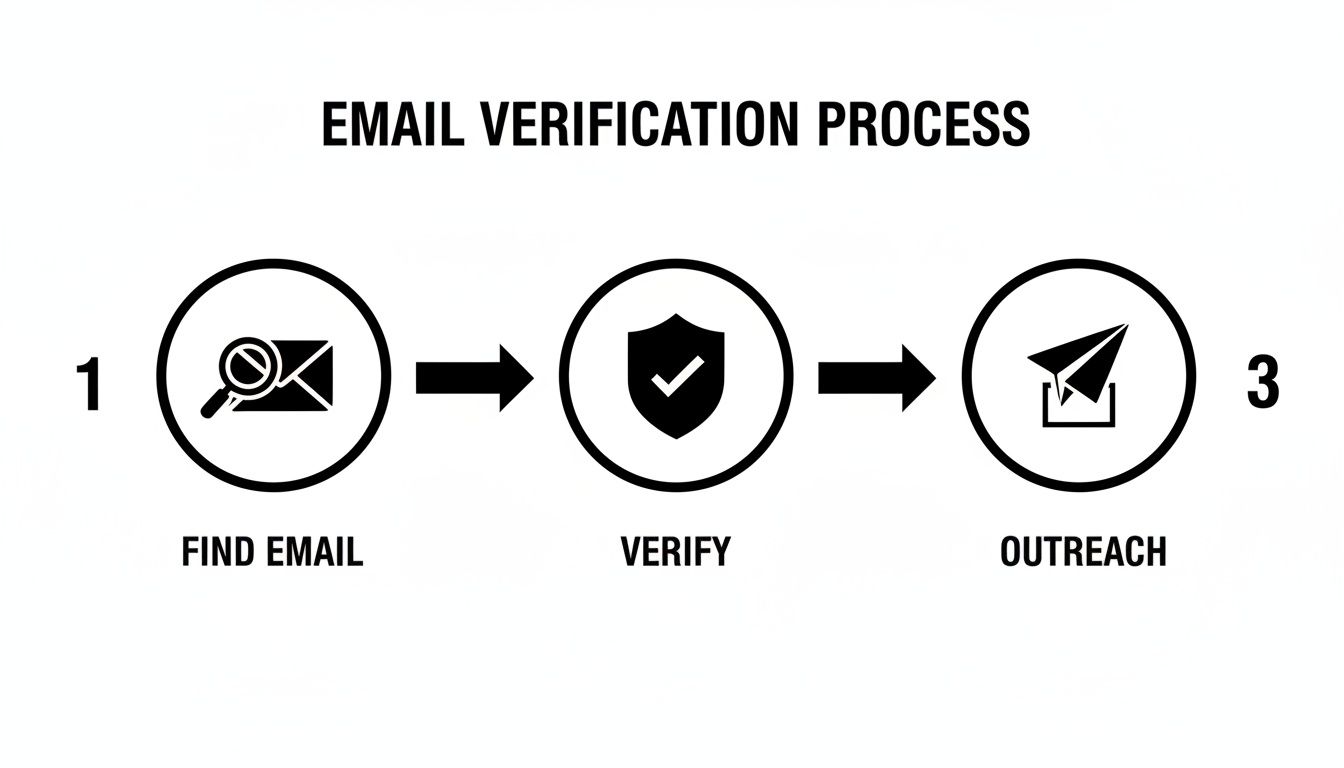
Automation platforms are designed to execute this exact process flawlessly, and at a scale you could never achieve manually.
Automation in Action: A Real-World Scenario
Let's imagine a B2B SaaS startup trying to build a pipeline from the ground up. The old way—manually searching LinkedIn, guessing email patterns, and sending one-off messages—is painfully slow and the results are all over the place.
Now, let's see what happens when they plug in an automation platform. They set their ICP to target VPs of Marketing at tech companies with 50-200 employees. The platform then gets to work 24/7.
- Lead Discovery: It constantly scans sources like LinkedIn for new people who fit that exact profile.
- Data Enrichment: It automatically finds and verifies their business email and other key data points.
- Personalized Outreach: New prospects are immediately enrolled in multi-step email sequences, with messages personalized using data pulled right from their profiles.
The impact is almost immediate. The sales team's calendars start filling up with qualified meetings, and they haven't spent a single minute on manual prospecting. This kind of system allows a small team to have the output of a much larger one, boosting efficiency and hitting revenue goals faster.
The real magic of automation isn't just speed. It's about executing your perfect prospecting process consistently, every single time, without human error or burnout. It builds a reliable system for growth.
For teams who want to push their email finding and outreach even further, leveraging lead prospector virtual assistants is another great move. These specialists can handle parts of the workflow, working alongside your automation tools to build super-targeted lead lists or even manage initial outreach. It's all about creating a system where your best people spend their time on high-value conversations, not on data entry.
Staying on the Right Side of Email Outreach
So, you’ve gotten pretty good at finding business email addresses. That’s a huge step, but with that skill comes a heavy dose of responsibility. It’s one thing to find an email; it's another thing entirely to use it correctly. If you ignore the rules of the road, you’re not just being sloppy—you’re risking serious penalties that can tarnish your brand and hit your wallet hard.
Think of regulations like the CAN-SPAM Act in the U.S. and GDPR in Europe less as annoying hurdles and more as guardrails. They exist for a reason: to keep inboxes clean and ensure communication is honest and respectful. For anyone in B2B, this is your playbook for building trust right from that first "hello."
What You Absolutely Need to Know About Email Rules
You don't need a law degree to do this right, but you do need to grasp the fundamentals. The CAN-SPAM Act, for example, applies to all commercial messages, and that absolutely includes B2B emails. Getting this wrong can be incredibly expensive, with fines running up to $53,088 for a single email.
Here are the non-negotiables you have to bake into your process:
- Make Unsubscribing Easy: Every single email needs a clear, obvious way for people to opt out. And that link has to work for at least 30 days after you hit send.
- Act on Opt-Outs Immediately: When someone asks to be removed, you have 10 business days to get them off your list. No excuses. You also can't make them jump through hoops, like paying a fee or giving you any info other than their email.
- Don't Be Deceptive: Your "From," "To," and "Reply-To" fields must accurately identify who you are. The subject line needs to reflect what's actually in the email—no clickbait tricks.
- Identify Yourself: You have to include a valid physical postal address somewhere in your email. It's the law.
Respecting someone's inbox is the foundation of modern B2B sales. This isn't just about dodging fines; it’s about showing you’re a professional who values the other person's time. That's how you build a reputation that actually opens doors.
Best Practices for Outreach That People Appreciate
Beyond the strict legal requirements, there's the human element. Ethical outreach means not being that annoying, spammy person who just burns bridges. It’s all about personalization and offering real value.
Take a few minutes to actually research your prospect. What are their biggest challenges right now? How can you genuinely help? A message tailored to their specific world shows you’ve done your homework. This approach doesn't just keep you compliant—it’s what actually gets you a reply.
Got Questions? We've Got Answers
When you're diving into the world of business email discovery, a few questions always pop up. Let's tackle the most common ones, from legal lines you can't cross to how much you can really get done with free tools.
Is Finding and Using Someone's Business Email Legal?
Yes, for B2B outreach, it's generally legal—as long as you play by the rules. Regulations like the CAN-SPAM Act in the U.S. set clear guidelines for sending commercial emails. The whole point is to be transparent and give people an easy out.
To stay compliant, every single email you send must have:
- A subject line that accurately reflects the content. No tricks.
- Your company's valid physical postal address.
- An obvious, one-click way for them to unsubscribe.
Don't take this lightly. The fines for violating these rules are steep, reaching up to $53,088 per email. Good outreach isn't just about following the law; it's about starting a relationship built on respect, not spam.
How Reliable Are Email Finder Tools, Really?
The quality varies a lot, but the best tools on the market consistently hit 95-98% deliverability rates. They get there by cross-referencing multiple data sources and running real-time checks to see if an inbox is actually live before they serve it up to you.
That said, nothing is 100% foolproof. A good signal of a trustworthy tool is one that gives you a "confidence score" or a clear status for each email, like Valid, Risky, or Invalid. This insight helps you avoid the duds and protect your own domain from being flagged for high bounce rates.
A great tool doesn't just find an email. It gives you the context you need to decide if that email is actually safe to use for your campaign. That distinction is everything for keeping your deliverability high.
Can I Get By With Just Free Tools?
For small-scale, targeted prospecting, absolutely. If you only need to find a few key emails a day, you can get surprisingly far with clever Google searches and a bit of LinkedIn detective work.
The problem comes when you need to scale up. Trying to build a prospect list of hundreds or thousands of contacts by hand is a surefire way to burn through your time with little to show for it. When you hit that wall, investing in a paid tool with bulk search and verification features will give you a much better return on your effort.
Ready to stop wasting time on manual prospecting and start booking more meetings? Roger uses AI to run your entire outbound sales motion for you—from finding verified decision-makers to sending personalized, multi-step outreach.